-> Translated from the original German article with the help of ChatGPT and DeepL
As announced in the article on the Kase 5.6/200 mirror telephoto lens, here is a review of another third-party lens with an XCD mount for Hasselblad cameras: the Laowa 4.0/17mm Zero-D Shift.
Introduction
Why this lens in particular? After Venus Optics released the Laowa 2.8/35mm Macro Tilt/Shift in late 2025 and the Laowa 4.0/17mm Tilt/Shift in early 2026 (both also available with an XCD mount) – and got me hooked on tilt-shift photography – I started looking into what other options were available with the Hasselblad in this regard. In the medium-format sector, Hasselblad itself offers a tilt-shift adapter; Fuji offers a 30mm Fujinon tilt-shift lens for the GFX system; and in the 35mm format, there are several manufacturers—Canon, in particular, is well-positioned in this area. However, each of these options comes with its own set of drawbacks: weight, price, availability, an image circle that’s too small, cumbersome handling with adapters, etc.
So it soon became clear to me that it would likely be one of the two newly introduced Laowa lenses. No fiddling with adapters, a fair price, easy handling, and the image circle seemed sufficient even for small medium format. The 2.8/35 Macro is, of course, the much more versatile lens. Its fast maximum aperture, moderate wide-angle field of view, and macro capability make it more universally applicable than the 17mm. But I already own a lens with a similar focal length—the XCD 4.0/28mm—and for those rare occasions when I want to get closer, I have the Hasselblad 9mm extension tube. On the other hand, the 17mm ultra-wide-angle lens allows for some pretty spectacular perspectives, and I don’t own anything in this focal length range yet anyway. So I decided on the 17mm. The question remained: tilt/shift or just shift? I opted for the latter; tilt (for controlling/shifting the plane of focus) didn’t seem that useful for my purposes and would have been just another source of error for me (accidentally adjust the tilt mechanism by 1° and you’ll wonder why half the image is suddenly out of focus…). Another advantage of the shift-only version: The shift is controlled via a rotational movement rather than a difficult-to-control adjustment screw. As the icing on the cake, the Laowa has a relatively flat front lens, which allows for the use of conventional screw-in filters—so no need for cumbersome and expensive special filters or adapters. So, after a lot of comparing and weighing my options, I finally settled on the Laowa 4.0/17mm Shift.
And as always, the usual disclaimer: I am neither sponsored by nor friends with, related by marriage to, or otherwise affiliated with Laowa or any other photography company; I ordered the lens myself and paid for it out of my own pocket. So, like all my other reviews, this one is ruthlessly subjective… 😉
Expectations
What I’ve written above already hints at my expectations for this lens: I’m not looking for images that are as realistic as possible; rather, I want dramatic perspectives, unusual viewpoints, and creative angles. All of this is further enhanced by the shift function – and, of course, with high technical quality.
Description: How Shift Works
First, a brief overview of how a shift lens works and why it’s useful. Every photographer is familiar with this problem: You’re on vacation, standing in front of a massive cathedral and, even with a wide-angle lens, you have to tilt the camera upward to get the spire in the frame. This creates what are known as “converging lines”—that is, the building appears to get thinner toward the top, giving the impression that it’s about to fall backward or that the facade is tilted. This happens because the image plane (i.e., the cathedral’s facade) and the sensor plane aren’t parallel (since the camera is tilted upward or the sensor is tilted backward). The shift function circumvents this dilemma by allowing the sensor to remain parallel to the image plane while still capturing the spire in the frame. How does this work? A shift lens has a much larger image circle than would actually be necessary for this focal length in combination with the sensor. The shift function allows the sensor to be moved within this large image circle—in the case of the cathedral, upward. This brings the spire into the frame while elegantly cropping out the uninteresting ground at the bottom edge of the image.


without shift function

with shift function
Since the shift mechanism works in all directions (360°), the sensor can be positioned anywhere within the image circle. For example, if you’re standing on a raised surface and want to take a photo looking down, you simply shift the optical system in the opposite direction. A very interesting feature is the ability to stitch panoramas from multiple individual images without distortion (!). This works both horizontally and vertically. If you shift diagonally, you can combine perspective correction with the panorama function.


Here’s another example of how to adjust the perspective: In the following example, I want both archways to be in the frame.


There’s no right or wrong here—it’s a conscious, creative decision about which parts of the image you want to emphasize or let fade into the background!
By the way: You can achieve all of the above effects even without a shift lens! Simply use a shorter focal length than would actually be necessary for the subject. The angle of view must be wide enough so that the subject fits entirely within the frame when the camera is held horizontally. In the example of the church above, for instance, the “empty” foreground is simply cropped out during post-processing. Of course, you lose a significant amount of resolution this way, but with today’s high-megapixel cameras, this is generally a manageable trade-off when using this effect occasionally.
First Impressions and First Photos
First impression after unboxing: Heavy and loads of adjustment knobs… 😉 . Lots of glass and metal give it a very solid feel. However, the many adjustment options (see below) make the lens feel a bit “fragmented”; only time will tell how all these knobs and adjustment options hold up even after years of use. The excellent build quality gives me hope, though. After getting familiar with all the creative possibilities, I was naturally drawn outside to take my first pictures and, above all, to see just how much flexibility the small medium format actually offers. Laowa explicitly advertises that the image circle is large enough for the 44×33 sensor. Otherwise, it would make no sense to offer a version with an XCD mount. And indeed, the results are quite convincing. And if you need even more leeway, you can crop the image to 36×24 and still have the full range of adjustment options while retaining approximately 66 megapixels. Like all third-party lenses on the Hasselblad, it can only be used with the electronic shutter. It also has no electronic contacts on the mount; neither the aperture nor any other settings are transmitted – and we won’t even mention autofocus.

–
Findings After the First Few Weeks
I really enjoy using this lens. That said, it also suits my style of photography very well. First, I explore the subject from all sides (usually a house or building complex) looking for the best perspective, then I set it up on a tripod and use the Arcaswiss gear-driven head to calmly and precisely adjust each axis, manually set all the lens settings, and take the shot—often using an ND filter for a long exposure to soften the sky. Of course, you can also shoot handheld with the Laowa, with or without the shift setting, but somehow it just doesn’t feel “right.” That’s just my subjective perception, I know 😉 . The lack of autofocus doesn’t matter at all in practice: at a 17mm focal length and f/8, practically everything from two meters to infinity is in focus. Only when you take advantage of the 25-cm minimum focusing distance do you need to be more precise.
At first, I used the tripod clamp. The advantage: Switching from landscape to portrait orientation happens in a flash: you simply rotate the body 90° without changing the alignment of the shift mechanism. However – and this is my only criticism regarding stability – the whole setup then feels a bit “wobbly” and prone to vibration. I think the mount for the tripod adapter on the lens barrel is too narrow. On top of that, the officially Arca-Swiss-compatible base isn’t 100% compatible. If I want to use it on my (note: original) Arca-Swiss gear-driven head, I have to screw an adapter plate in between, which doesn’t help stability either. That’s why I removed the tripod clamp and, as usual, use my Rogeti L-bracket to connect the camera to the tripod. This makes changing formats a bit more cumbersome, but it’s good for stability.

–
Technical Image Quality
Image quality in the center is very good – sharp, rich in detail, and high in contrast. It becomes slightly softer toward the corners. When the image circle is fully utilized (maximum shift), the lens exhibits visible vignetting, which becomes slightly more pronounced when using a filter (I like to use an ND filter for long exposures). However, this can usually be corrected relatively well in post-processing. Otherwise, the X2DII’s 100MP sensor gives me enough headroom for a little cropping. The barrel or pincushion distortion of straight lines – a common issue with ultra-wide-angle lenses – is superbly corrected on the Laowa; see the images of the scaffolding above. The “Zero-D” (=Zero Distortion) in the name is therefore well-deserved. However, one must distinguish between distortion and warping. While the former is very well corrected, the latter persists due to the short focal length; that is, objects in the foreground at the edge of the image are rendered distorted. But this is a characteristic of all super-wide-angle lenses and has nothing to do with this particular lens or the shift function.
In practice, the following approach has worked well for me: I display the 24×36 mask in the Hassi’s viewfinder, so I see the image that a full-frame sensor would see—and compose the shot accordingly. This then gives me plenty of room to crop (or expanding) in all directions during post-processing.

–

–

I’m usually a big advocate of using a lens hood. It not only protects against stray light and reflections, but is also useful against dust, rain, and mechanical damage to the front element. With the Laowa, however, I actually unscrewed it. At 17mm, it’s so narrow that it’s hardly useful, but it still has to be rotated depending on the shift position, otherwise it’ll intrude into the frame. After getting annoyed with myself a few times for forgetting to do this, I gave up… It’s just the nature of the lens that it’s then a bit more prone to lens flare. If necessary, you can also use your hand or an object to block out some light. Although with an ultra-wide-angle lens, you have to be careful to make sure your hand actually stays outside the frame…
Architecture
Naturally, the shift function is particularly useful and widely used in architectural photography. And for me, as a novice in both ultra-wide-angle and shift photography, buildings offer a simple yet steep learning curve 😉 . As mentioned above, the dramatic and exaggerated perspective is entirely intentional. However, I quickly realized that 100% perspective correction – that is, having all the building edges exactly vertical – is usually too much of a good thing. The buildings then look as if they’re getting thicker toward the top. That’s why it makes sense to allow for a little bit of converging lines. How much is a matter of taste.


In my opinion, the additional abstraction in black&white fits very well with the exaggerated perspective (and the bad weather with rain and dark clouds):


Landscape
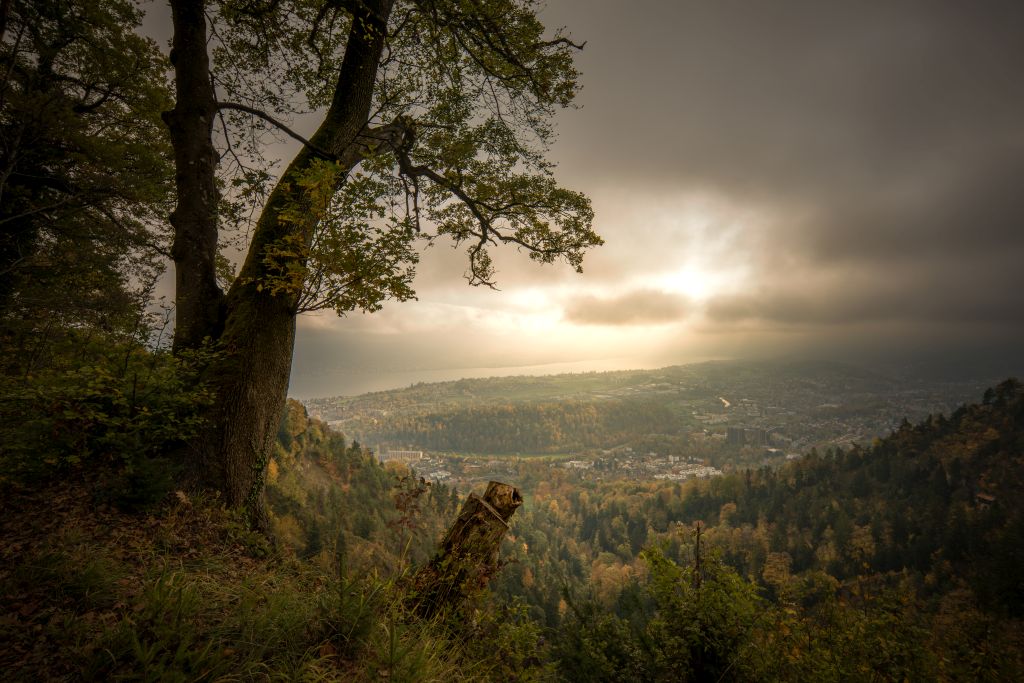
Even though the shift function is primarily associated with architectural photography, there are plenty of uses for it in nature and landscape photography as well. Here, too, there are often situations where you’re shooting upward or downward. Of course, the effect of perspective distortion is sometimes exactly what you want and can be used as a deliberate creative element, but with the shift function, you have the choice – or rather, you can precisely control the degree of distortion or correction. And with vertical structures like trees or forests, it usually makes sense anyway. In fact, you actually have even more leeway in landscape photography than in architectural photography; while you can immediately tell when proportions are off with geometric shapes like buildings, this is hardly noticeable with organic shapes like trees, etc.
The following trio of photos was taken from exactly the same spot, without moving the tripod even a centimeter/inch. It shows that the shift function can do more than just straighten vertical lines. Depending on the camera’s angle and how the shift function is used, the way the subject appears changes dramatically.

Shift up

Without shift

Shift downward (!)
In the left image, the shift function was used to its fullest extent. The tree’s crown appears oval and elongated. In the middle image, the camera was tilted upward without using the shift function. The tree appears stockier and rounder. In the third image on the right, the camera was tilted upward even more, and the frame was shifted downward (!). As a result, the tree appears not only stockier but also larger; just as tilting the camera downward emphasizes the foreground or the lower half of the image, tilting the camera upward makes the background or the upper half of the image stand out.
To be clear, this isn’t about which representation is right or wrong, but solely about the creative freedom that the adjustment capabilities of a shift lens offer the photographer.
Side note: In case anyone noticed the different rocks along the path in the three photos: There was an ugly red-and-white construction barrier set up there. Since it was quite distracting, I quickly and roughly removed it using the AI retouching tool in LR. In doing so, the AI made different corrections depending on the composition of each photo. However, this had no effect on the main subject the tree
People
People? Of course, you can also photograph people with the Laowa. However, as with any ultra-wide-angle lens, you should take great care to position people more or less in the center of the frame; otherwise, see the picture of the fire hydrant above… 😉 . And speaking of shift: It’s not recommended for people, because what creates spectacular perspectives with buildings tends to be distorting when used on people.

Conclusion
As you can easily gather from my comments above, I’m quite enthusiastic about this lens. I bought it primarily for architectural photography. However, I soon realized that a shift lens can do more than just correct converging lines; it’s a powerful tool for controlling perspective in general, including in landscape photography. It opens up a wide range of creative new perspectives and experiments. With that in mind, I find myself wondering in hindsight whether I shouldn’t have bought the version that includes tilt – that would have opened up even more creative possibilities…
Like all of my (three) third-party lenses for the Hasselblad, the Laowa isn’t a replacement for the native XCD lenses, but rather a complement to them. All three have unique characteristics that are only possible with that specific lens (or lens type): The TTArtisan 1.25/90mm has a razor-thin depth of field, the Kase 5.6/200 mirror telephoto lens has a distinctive donut bokeh, and the Laowa 4.0/17mm Shift lens offers the ability to control the perspective.
Pro’s
- When using the Laowa as a standard super-wide-angle lens without shift, you’re only using the center of the image circle, which benefits image quality
- It’s a tool for thoughtful photography—think perspective control
- Very solidly built
- Excellent sharpness
- Virtually no distortion
- Controlled shift function by rotating the entire lens barrel
- Image circle is more than sufficient even for the small medium format 33×44
Con’s
- Heavy
- Large, exposed front lens
- The lens hood is clever, but in practice it’s either useless or annoying
- Fully manual; no information is transmitted to the camera
- The tripod clamp isn’t 100% Arca-Swiss compatible
- When using the tripod clamp, the entire setup becomes somewhat prone to vibration
________________________________________________
For all photos in this blog: Copyright by Enrico Caccia, all rights reserved.
For all photos in this blog: Copyright by Enrico Caccia, all rights reserved